Bulk Create Issues
Create hundreds of JIRA issues from spreadsheet rows in one click.
The Bulk Create Issues feature lets you push rows from your spreadsheet directly into JIRA, creating new issues for each row. This is ideal for sprint planning, migration, or importing tasks from other systems.
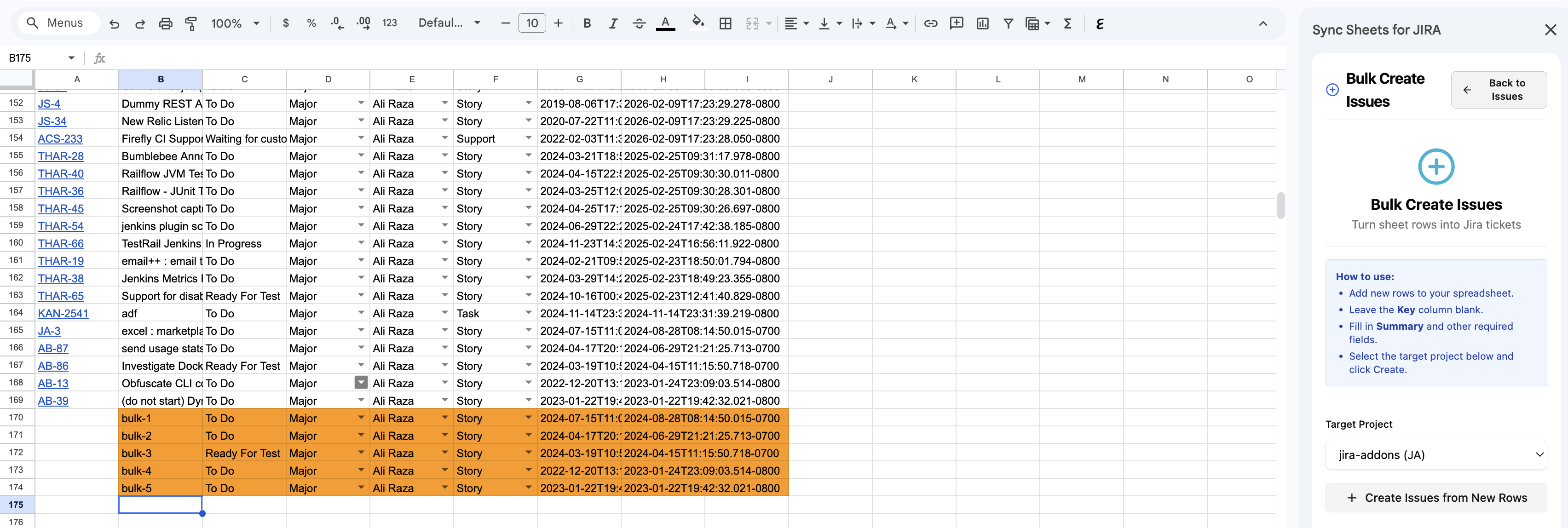

Keep the issue Key column empty — it will be created automatically after the issues are pushed to JIRA.
How it works
- Prepare your spreadsheet with one row per issue. Include columns for the fields you want to set (e.g., Summary, Description, Type, Priority, Assignee).
- Open the Bulk Create Issues panel from the sidebar.
- Map your spreadsheet columns to JIRA fields.
- Select the target JIRA project.
- Click Create to push all rows as new JIRA issues.
Required fields
At minimum, each row must include:
| Field | Description |
|---|---|
| Summary | The issue title |
| Project | The target JIRA project key (can be set globally or per-row) |
| Issue Type | e.g., Task, Bug, Story (can be set globally or per-row) |
Optional fields
You can map any additional JIRA fields:
- Description, Priority, Assignee, Reporter
- Labels, Components, Fix Versions
- Sprint, Epic Link
- Custom fields
Field mapping
The addon will attempt to auto-map columns by matching header names to JIRA field names. You can manually adjust mappings before creating issues.
After creation
Once issues are created, the addon writes back the JIRA issue key (e.g., PROJ-123) into a designated column in your spreadsheet so you can track which rows were successfully created.